> ## Documentation Index
> Fetch the complete documentation index at: https://docs.verifyyou.com/llms.txt
> Use this file to discover all available pages before exploring further.
# Comprehensive trust score
> How we use active and passive signals to protect your platform.
Clicking a row in Activity opens the person behind it.
We collect two kinds of signal on every check. Active ones come from the person in front of the camera: whether the face is live, how confident we were, whether we have seen it before. Passive ones come from everything around them: the IP and where it resolves to, the device and browser, how often they have appeared and how fast. Combined, they make a trust score, and because it is recalculated on every run it moves as the person's behaviour moves rather than sitting still from the day they signed up.
 ## The score
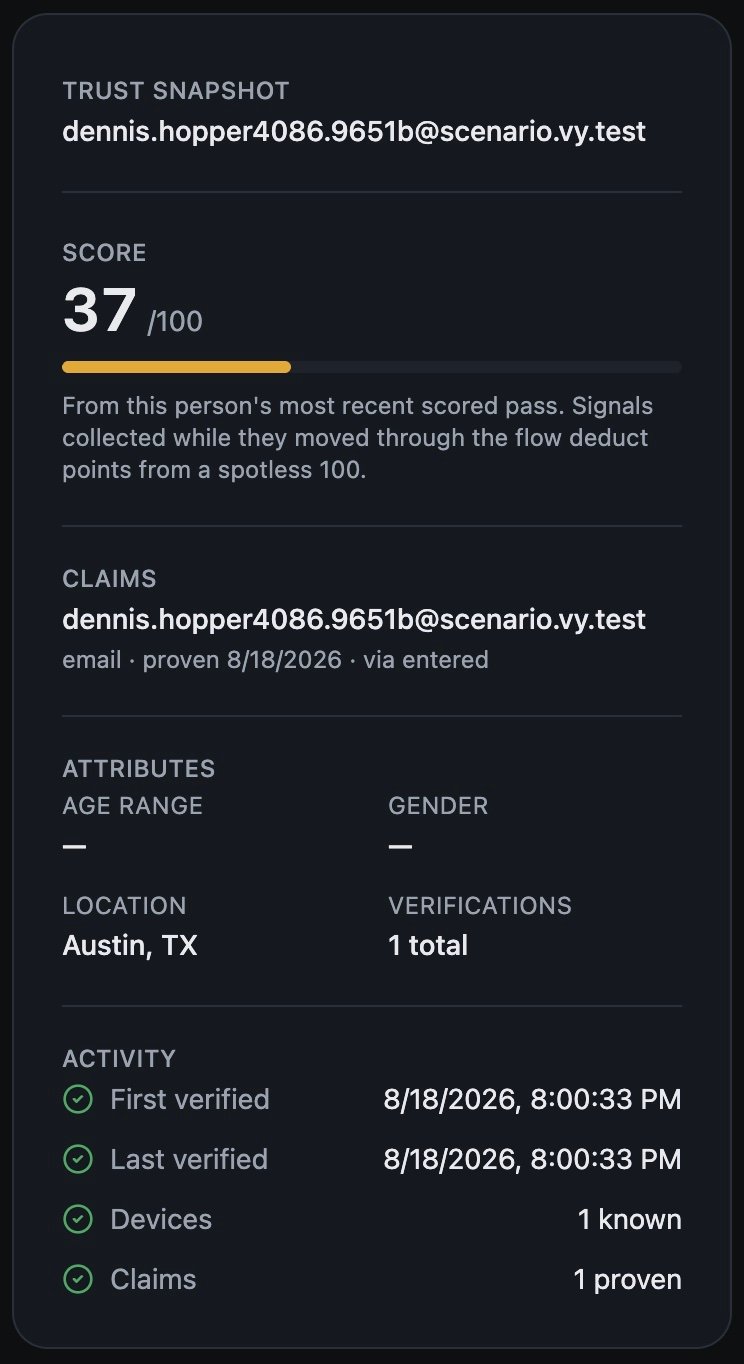
A score out of 100 sits beside every tab. Everyone starts at 100, and anything suspicious we detect during the run subtracts from it, weighted by how suspicious it is.
The score shown is from this person's most recent scored pass, so it tells you about that run rather than standing as a permanent rating. Somebody who was clean last month and arrived through a datacenter IP this morning shows you this morning.
Read it as a priority. A high score means we found little worth reporting. As it falls, there is more to look at, and by the time it is in the low tens there is usually a clear reason sitting one click away. What it never does is decide anything: your configuration settles the pass or fail.
## What we saw: the Signals tab
The score is the summary. **Signals** is the evidence, grouped into five categories with a count against each and a filter for high, medium or low strength.
## The score
A score out of 100 sits beside every tab. Everyone starts at 100, and anything suspicious we detect during the run subtracts from it, weighted by how suspicious it is.
The score shown is from this person's most recent scored pass, so it tells you about that run rather than standing as a permanent rating. Somebody who was clean last month and arrived through a datacenter IP this morning shows you this morning.
Read it as a priority. A high score means we found little worth reporting. As it falls, there is more to look at, and by the time it is in the low tens there is usually a clear reason sitting one click away. What it never does is decide anything: your configuration settles the pass or fail.
## What we saw: the Signals tab
The score is the summary. **Signals** is the evidence, grouped into five categories with a count against each and a filter for high, medium or low strength.
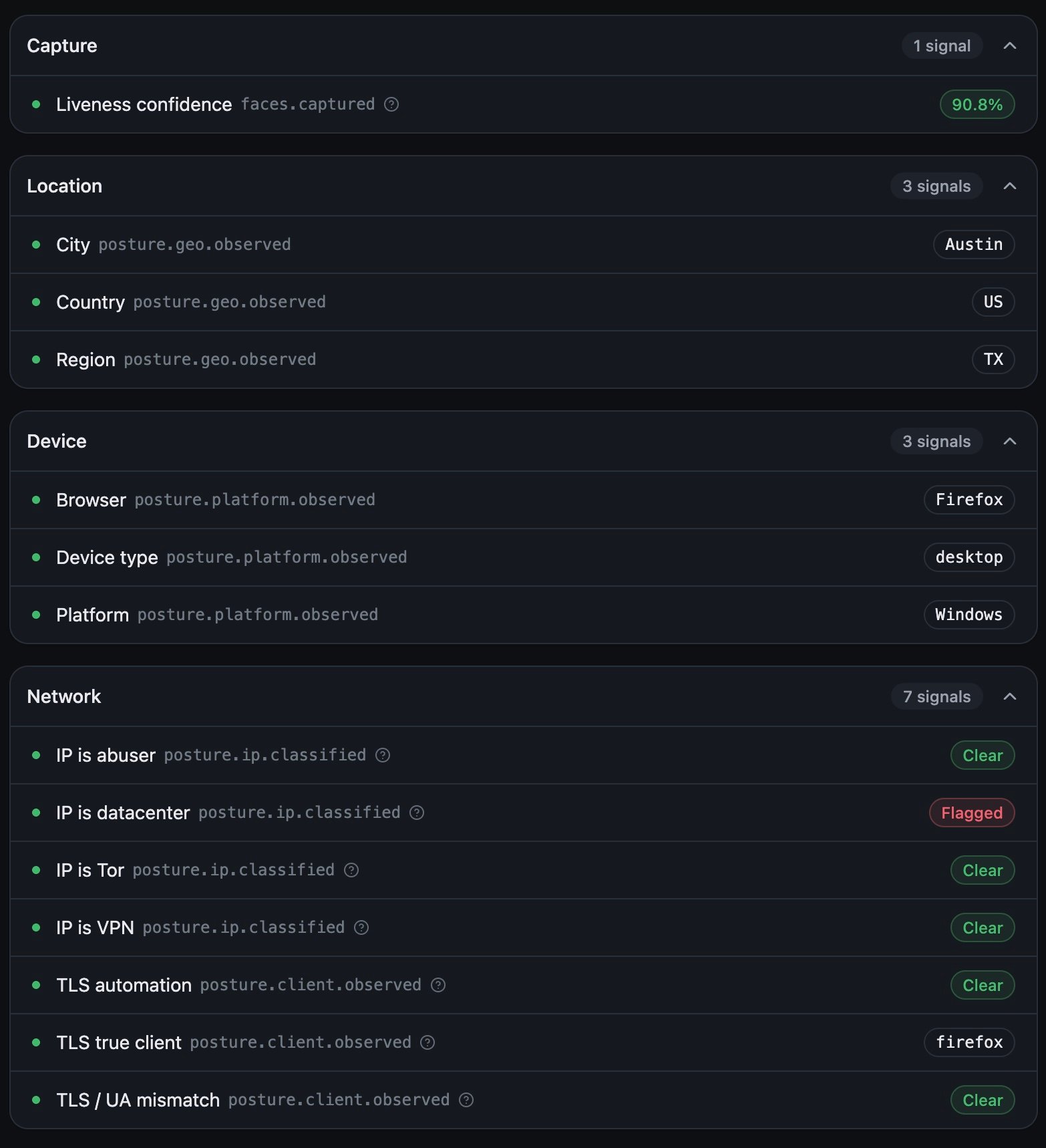 **Capture** is the check itself: how many liveness attempts they made, how confident we were in the live face, and the reason if it failed. Several attempts and low confidence is the pattern behind most held-up screens and replays.
**Person** is what we estimated from the scan: an age range and a gender, each with its own confidence. Estimates rather than proof, and useful mainly when they contradict what the person told you.
**Location** is derived from the IP address: country, region and city. Worth holding against where you expected them, and against where they were last time.
**Device** is the platform, device type and browser. One person across several devices is normal. Several people on one device is not.
**Network** is usually the group that moves the score, and it is the hardest for somebody to hide. Whether the IP is a VPN, a datacenter, a Tor exit or already known for abuse, and whether the connection behaves like the browser it claims to be, which covers TLS automation, a TLS and user agent mismatch, and the TLS client itself. A person can change their face's surroundings far more easily than they can change how their traffic looks.
## What we flagged: the Flags tab
Anything our checks raised on this person, with the reason attached. Empty means every run came through clean rather than nothing being looked at.
## Where they have been: the History tab
Every confirmation this person appears in, newest first, including runs where they are only the evidence. A denial shows its reason inline, so `limit reached` tells you your own limit fired.
This is the tab that gives you a baseline. One low-scoring run from a first-timer is thin. One low-scoring run from somebody with twelve clean ones behind them is a change, and changes are what you want to catch.
## Who they are to you: the summary panel
**Claims** is the field to read first. It names the phone or email bound to this person, when it was proven and how. If there is one, this person can be recognised on any device, anywhere you run a check. If there is not, recognition stops at the device they used, and they will look new the next time they arrive on another one.
**Attributes** repeats the estimates from the scan alongside how many verifications they have with you in total.
**Activity** is their span with you: when they first and last verified, and how many devices we have seen them on.
**Next:** [Exporting users](/docs/activity/exporting-the-list)
**Capture** is the check itself: how many liveness attempts they made, how confident we were in the live face, and the reason if it failed. Several attempts and low confidence is the pattern behind most held-up screens and replays.
**Person** is what we estimated from the scan: an age range and a gender, each with its own confidence. Estimates rather than proof, and useful mainly when they contradict what the person told you.
**Location** is derived from the IP address: country, region and city. Worth holding against where you expected them, and against where they were last time.
**Device** is the platform, device type and browser. One person across several devices is normal. Several people on one device is not.
**Network** is usually the group that moves the score, and it is the hardest for somebody to hide. Whether the IP is a VPN, a datacenter, a Tor exit or already known for abuse, and whether the connection behaves like the browser it claims to be, which covers TLS automation, a TLS and user agent mismatch, and the TLS client itself. A person can change their face's surroundings far more easily than they can change how their traffic looks.
## What we flagged: the Flags tab
Anything our checks raised on this person, with the reason attached. Empty means every run came through clean rather than nothing being looked at.
## Where they have been: the History tab
Every confirmation this person appears in, newest first, including runs where they are only the evidence. A denial shows its reason inline, so `limit reached` tells you your own limit fired.
This is the tab that gives you a baseline. One low-scoring run from a first-timer is thin. One low-scoring run from somebody with twelve clean ones behind them is a change, and changes are what you want to catch.
## Who they are to you: the summary panel
**Claims** is the field to read first. It names the phone or email bound to this person, when it was proven and how. If there is one, this person can be recognised on any device, anywhere you run a check. If there is not, recognition stops at the device they used, and they will look new the next time they arrive on another one.
**Attributes** repeats the estimates from the scan alongside how many verifications they have with you in total.
**Activity** is their span with you: when they first and last verified, and how many devices we have seen them on.
**Next:** [Exporting users](/docs/activity/exporting-the-list)