> ## Documentation Index
> Fetch the complete documentation index at: https://docs.verifyyou.com/llms.txt
> Use this file to discover all available pages before exploring further.
# Flags
> Top users to investigate.
**Flags** is every person our own checks caught on this verification, one row per flag. It is scoped to your traffic: what somebody did on another platform in the network does not appear here.
## Reading the list
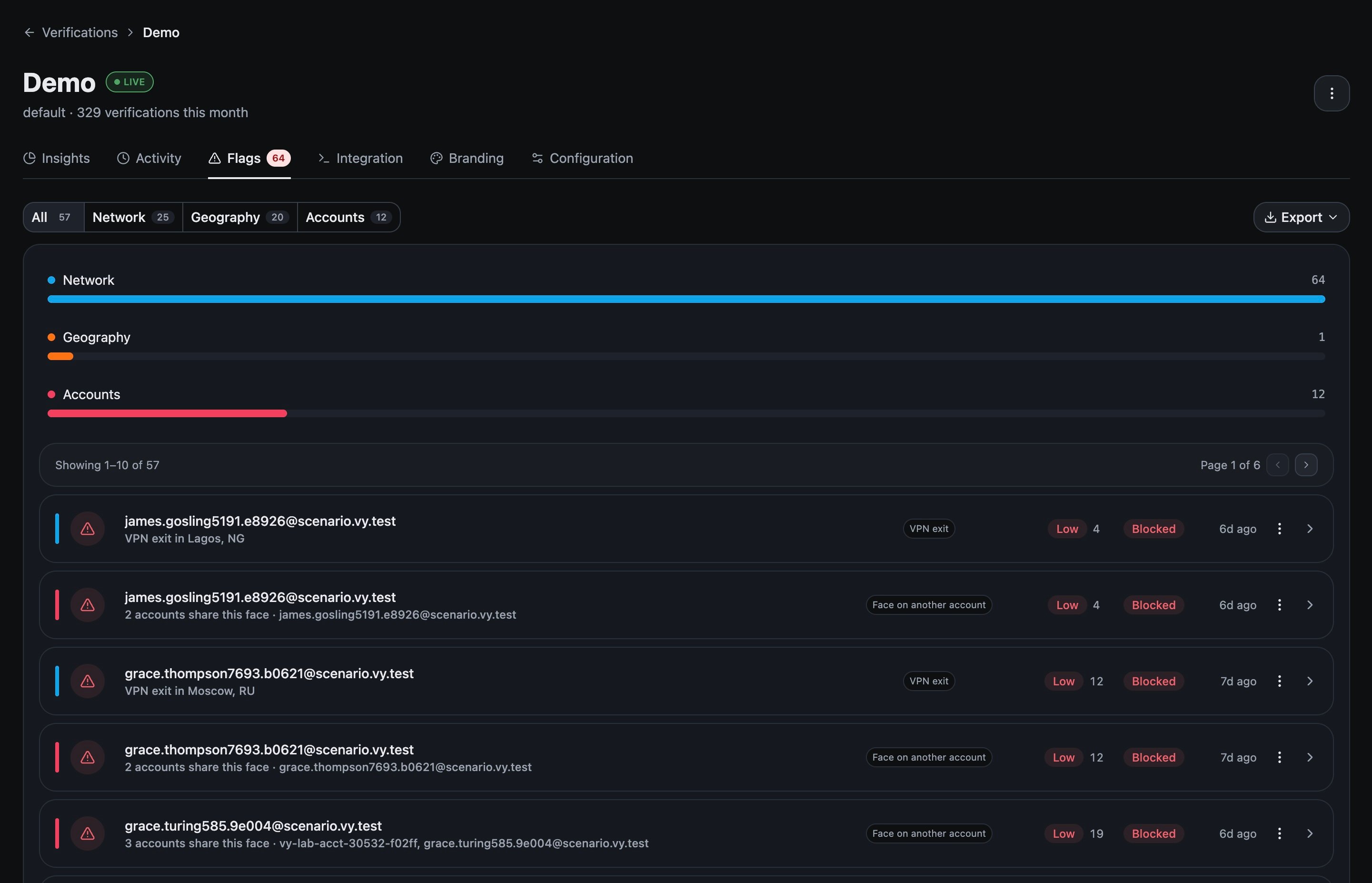 Each row carries the identifier, what we caught in plain language, the kind of flag, the trust band and score, the result, and how long ago it settled.
The reasons are written to be read rather than decoded. `VPN exit in Lagos, NG`. `2 accounts share this face`. When the flag is about accounts, the row names the other accounts, which is usually enough to act without opening anything.
One person can hold several flags. Somebody arriving through a VPN on a face that is already on another account appears twice, once for each.
## Narrowing it
Chips across the top split the list by family, **Network**, **Geography** and **Accounts**, each with its own count, and bars underneath show the split at a glance. **Export** takes whatever you are looking at.
## Opening one
Each row carries the identifier, what we caught in plain language, the kind of flag, the trust band and score, the result, and how long ago it settled.
The reasons are written to be read rather than decoded. `VPN exit in Lagos, NG`. `2 accounts share this face`. When the flag is about accounts, the row names the other accounts, which is usually enough to act without opening anything.
One person can hold several flags. Somebody arriving through a VPN on a face that is already on another account appears twice, once for each.
## Narrowing it
Chips across the top split the list by family, **Network**, **Geography** and **Accounts**, each with its own count, and bars underneath show the split at a glance. **Export** takes whatever you are looking at.
## Opening one
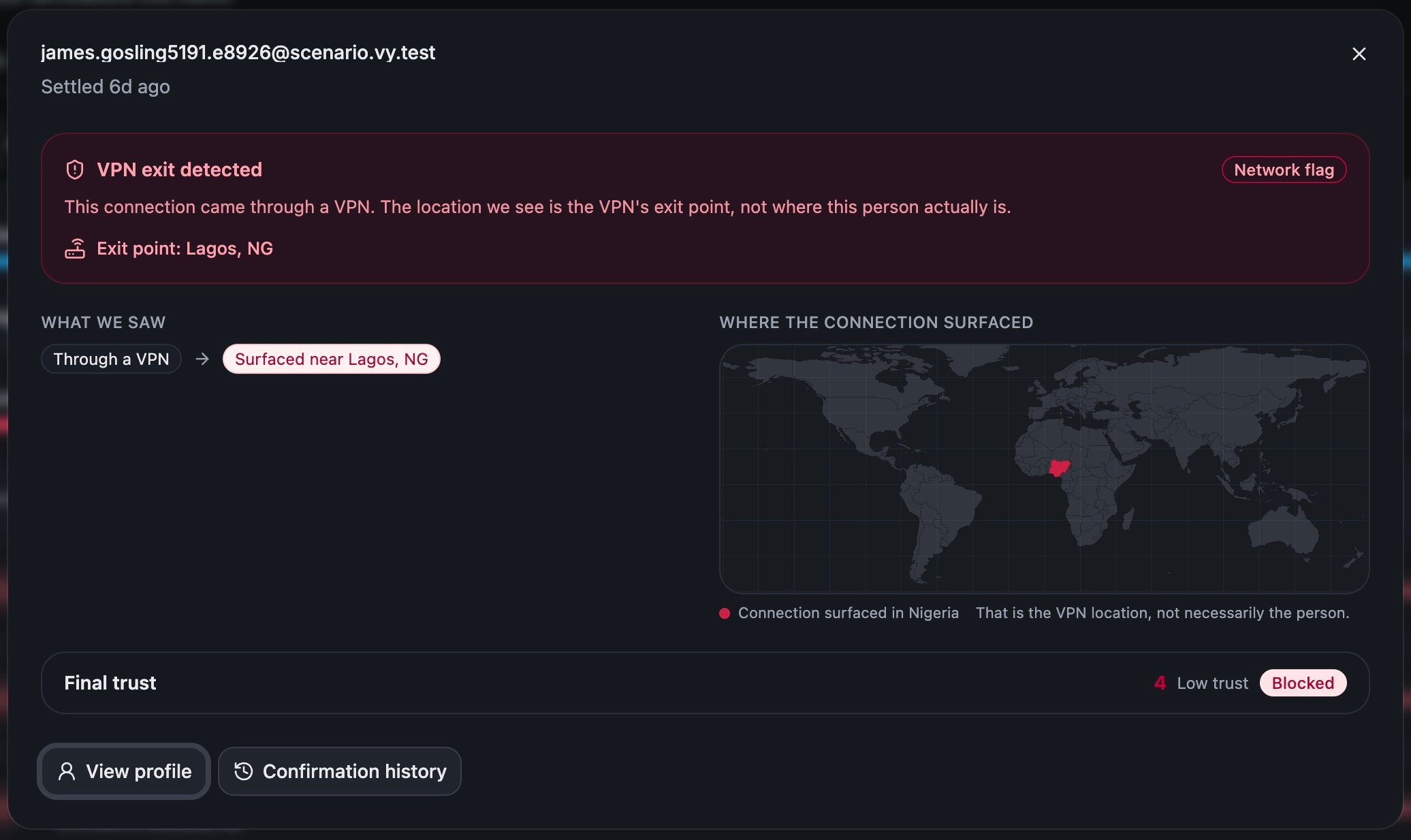 Click a row and you get the flag explained: what we saw, and for a network flag a map of where the connection surfaced. It ends on the final trust and the result, with **View profile** and **Confirmation history** to go further.
These views are careful about what they claim. A VPN flag says the exit point is where the connection surfaced and not necessarily where the person is, which is the honest reading and the one to repeat to your own team.
## A low score is not a flag
They answer different questions. On the live account this was checked against, a person carries a trust score of 45 and a **Denied** result with nothing flagged at all.
The score counts signals collected on the way through. A flag is a specific thing we caught. The result is your configuration acting. Denied with nothing flagged usually means a rule of yours fired, like the verification limit, rather than anything being wrong with the person.
## When to come here
Come to Flags when you have nobody particular in mind and want to know whether anything needs you. An accounts flag means one face is on more than one account, which is a collision, and [Configuration](/docs/verifications/configuration) decides what happens when one is found. Go to [Reading Activity](/docs/activity/reading-activity) when you already have somebody, or to slice the whole population by country, network or collisions.
**Next:** [Reading Insights](/docs/insights/reading-insights)
Click a row and you get the flag explained: what we saw, and for a network flag a map of where the connection surfaced. It ends on the final trust and the result, with **View profile** and **Confirmation history** to go further.
These views are careful about what they claim. A VPN flag says the exit point is where the connection surfaced and not necessarily where the person is, which is the honest reading and the one to repeat to your own team.
## A low score is not a flag
They answer different questions. On the live account this was checked against, a person carries a trust score of 45 and a **Denied** result with nothing flagged at all.
The score counts signals collected on the way through. A flag is a specific thing we caught. The result is your configuration acting. Denied with nothing flagged usually means a rule of yours fired, like the verification limit, rather than anything being wrong with the person.
## When to come here
Come to Flags when you have nobody particular in mind and want to know whether anything needs you. An accounts flag means one face is on more than one account, which is a collision, and [Configuration](/docs/verifications/configuration) decides what happens when one is found. Go to [Reading Activity](/docs/activity/reading-activity) when you already have somebody, or to slice the whole population by country, network or collisions.
**Next:** [Reading Insights](/docs/insights/reading-insights)