> ## Documentation Index
> Fetch the complete documentation index at: https://docs.verifyyou.com/llms.txt
> Use this file to discover all available pages before exploring further.
# Configuration
> How to make HumanCheck work for your use case.
Configuration allows you to adjust how the check behaves to match your use case. Every verification carries its own, so a strict check before a payout and a light one at signup run at the same time.
Understanding what your check protects is step one to configuring your check to behave how you need it to. For example, a signup that allows one account per human refuses the same human the second time, which you set in **Verification limit** by choosing *Once per lifetime*. A weekly payout cadence may want to allow each person through once per week, which is **Verification limit** on *Once per period* with the period set to weekly.
Our HumanCheck wizard walks you through the whole configuration, and we are here to help you get started on a check for your use case. If you would like a hand, [book a demo](https://sales.verifyyou.com) and we will walk through it with you.
## Identity
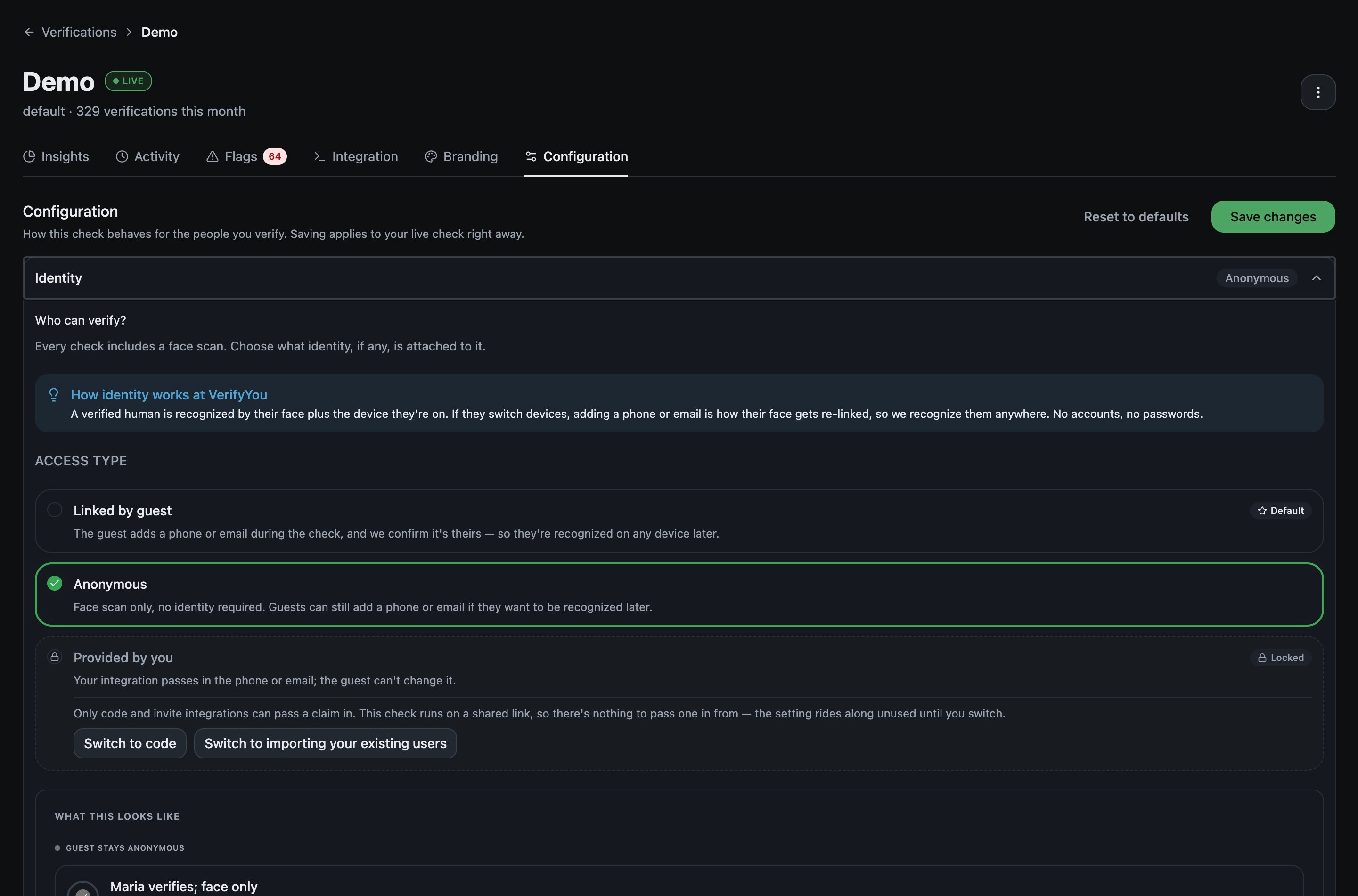 Is the user tied to a credential like an email or phone number, or not?
* **Linked by guest**, the default. Asks for a phone or email, so we know the same person when they switch device
* **Anonymous.** Asks for neither. Recognition stays with the device they used
* **Provided by you.** Takes an identifier from your own system, which the person cannot change. Code path only
Your integration method decides which of the three you can pick, and the tab says so. A check running on a shared link cannot use *Provided by you*, because there is nothing to pass a claim in from. A check that seeds every person from a list you imported can only use *Provided by you*, because the claim is already supplied. Either way the panel offers to switch method.
## Verification limit
How many times should each person be allowed to pass on one verification? It counts successful passes, not attempts.
* **Once per lifetime**, the default. A permanent decision, like opening an account
* **Once per period.** Something recurring, like a weekly payout
* **A few per period.** A set number of passes inside the period you choose, then nothing until it resets
* **Unlimited.** A checkout or a login, where you only need a live human present
Uniqueness covers a whole verification, so once somebody passes, every later run through that check is the same person to us. When one check gates several separate things, your integration sends a **group** to keep them apart. See [start a session](/v3/dev/integrating/start-a-session).
## Skip check on known devices
Off by default. Turn it on and somebody returning inside a window you set passes without scanning.
A silent pass still counts as a verification. Skipping changes what the person experiences, not what the check records.
## On collision
Is the user tied to a credential like an email or phone number, or not?
* **Linked by guest**, the default. Asks for a phone or email, so we know the same person when they switch device
* **Anonymous.** Asks for neither. Recognition stays with the device they used
* **Provided by you.** Takes an identifier from your own system, which the person cannot change. Code path only
Your integration method decides which of the three you can pick, and the tab says so. A check running on a shared link cannot use *Provided by you*, because there is nothing to pass a claim in from. A check that seeds every person from a list you imported can only use *Provided by you*, because the claim is already supplied. Either way the panel offers to switch method.
## Verification limit
How many times should each person be allowed to pass on one verification? It counts successful passes, not attempts.
* **Once per lifetime**, the default. A permanent decision, like opening an account
* **Once per period.** Something recurring, like a weekly payout
* **A few per period.** A set number of passes inside the period you choose, then nothing until it resets
* **Unlimited.** A checkout or a login, where you only need a live human present
Uniqueness covers a whole verification, so once somebody passes, every later run through that check is the same person to us. When one check gates several separate things, your integration sends a **group** to keep them apart. See [start a session](/v3/dev/integrating/start-a-session).
## Skip check on known devices
Off by default. Turn it on and somebody returning inside a window you set passes without scanning.
A silent pass still counts as a verification. Skipping changes what the person experiences, not what the check records.
## On collision
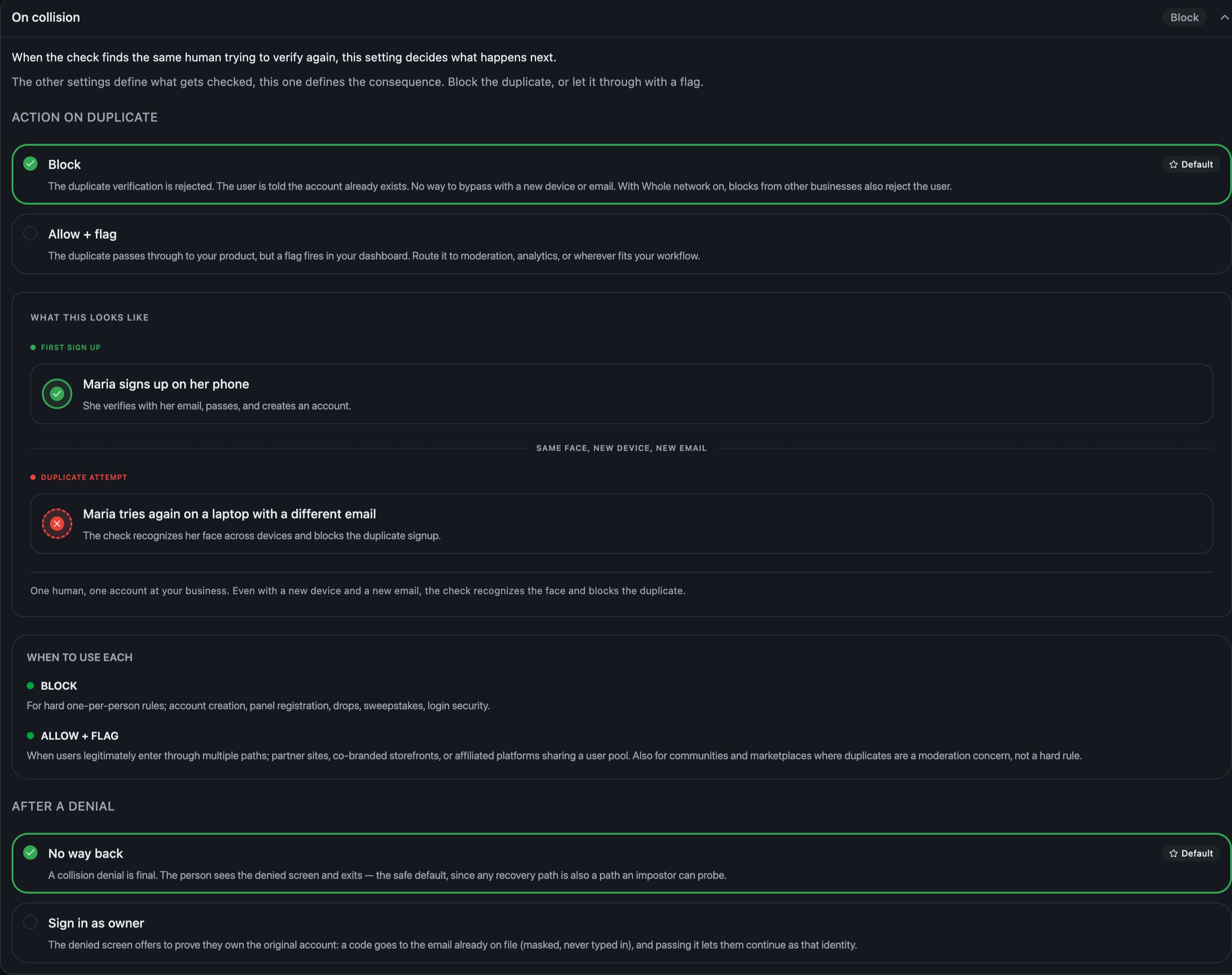 What should a second attempt under an alias cost them?
* **Block**, the default. Rejects the duplicate and tells them an account already exists
* **Allow + flag.** Lets them through and raises a flag for your team. Suits shared user pools, where a duplicate is a judgement call
The same panel sets what a denied person can do next, under **After a denial**:
* **No way back**, the default. The denial is final: they see the denied screen and exit
* **Sign in as owner.** The denied screen offers to prove they own the original account. A code goes to the email already on file, shown masked and never typed in, and passing it lets them continue as that identity
## Returning denied people
What happens when a device you already denied comes back.
* **Observe**, the default. Records the retry as a prior-denial flag and lets the fresh check judge them, which keeps the evidence
* **Block at the door.** Stops the device before the check runs. Cheaper, and it also stops the wrong person when a device is shared
## Age gate
Set a minimum estimated age to get through the check. Off by default. The estimate comes from the face scan, with no document to upload, and the thresholds are 13, 16, 18 or 21 and over, or one you set.
The check returns an estimated age range, not a precise year. Ranges span several years and accuracy is lowest near common thresholds. It is not legally sufficient for regulated products such as alcohol, gambling or firearms. Pair it with proper ID verification for those.
## Redirect URL
Where people are redirected after the check is completed. It sits inside the **Where people land** panel. Left on Default, they see the finish screen with the verdict and a done button. Set a URL and they land there instead.
It saves on its own, straight away. It is not part of the **Save changes** button at the top of the tab.
## Related
Which of these to answer first.
A worked job, end to end.
What recognition means, and where it stops.
Set the name and logo people see.
What should a second attempt under an alias cost them?
* **Block**, the default. Rejects the duplicate and tells them an account already exists
* **Allow + flag.** Lets them through and raises a flag for your team. Suits shared user pools, where a duplicate is a judgement call
The same panel sets what a denied person can do next, under **After a denial**:
* **No way back**, the default. The denial is final: they see the denied screen and exit
* **Sign in as owner.** The denied screen offers to prove they own the original account. A code goes to the email already on file, shown masked and never typed in, and passing it lets them continue as that identity
## Returning denied people
What happens when a device you already denied comes back.
* **Observe**, the default. Records the retry as a prior-denial flag and lets the fresh check judge them, which keeps the evidence
* **Block at the door.** Stops the device before the check runs. Cheaper, and it also stops the wrong person when a device is shared
## Age gate
Set a minimum estimated age to get through the check. Off by default. The estimate comes from the face scan, with no document to upload, and the thresholds are 13, 16, 18 or 21 and over, or one you set.
The check returns an estimated age range, not a precise year. Ranges span several years and accuracy is lowest near common thresholds. It is not legally sufficient for regulated products such as alcohol, gambling or firearms. Pair it with proper ID verification for those.
## Redirect URL
Where people are redirected after the check is completed. It sits inside the **Where people land** panel. Left on Default, they see the finish screen with the verdict and a done button. Set a URL and they land there instead.
It saves on its own, straight away. It is not part of the **Save changes** button at the top of the tab.
## Related
Which of these to answer first.
A worked job, end to end.
What recognition means, and where it stops.
Set the name and logo people see.