> ## Documentation Index
> Fetch the complete documentation index at: https://docs.verifyyou.com/llms.txt
> Use this file to discover all available pages before exploring further.
# Integration
> The four ways to put a check in front of people.
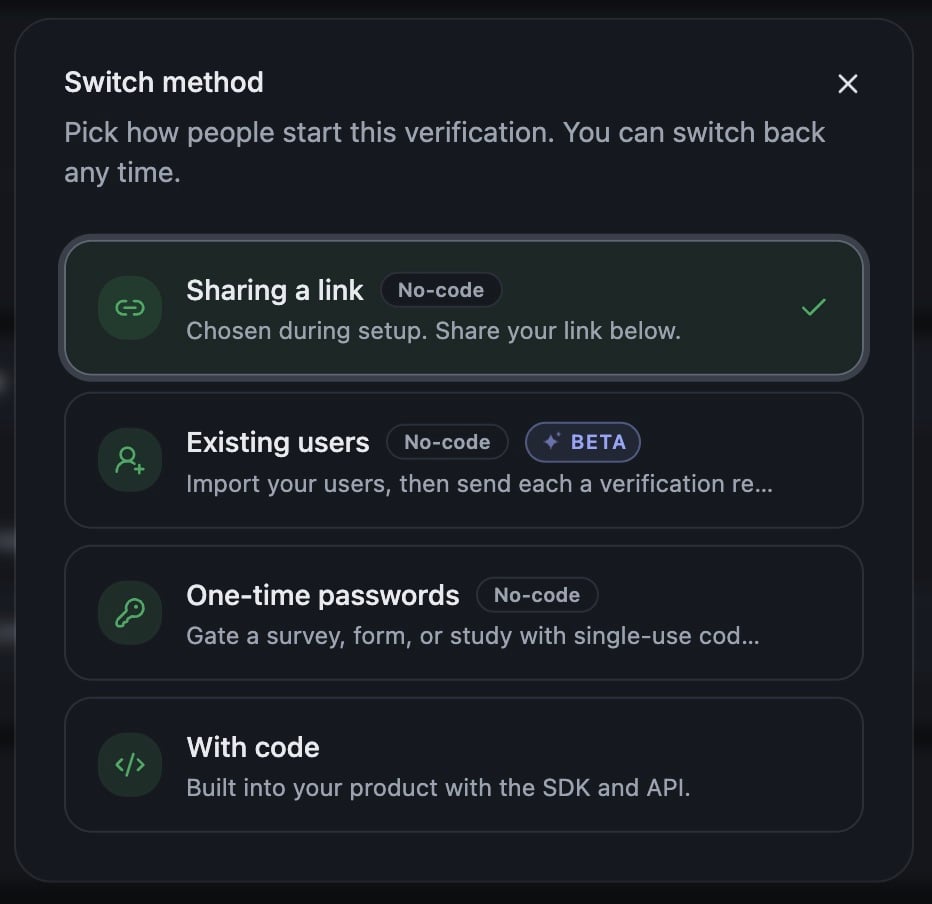
How the check reaches people is your choice, and you can change it whenever you like. Three of the four ways need no developer time at all, so you can prove value early without waiting on your roadmap.
Each verification's **Integration** tab shows the method it is using now, and **Switch method** swaps it.
 ## The three no-code methods
No code gets you started with zero developer effort, so you can prove value early without interrupting your roadmap.
**Sharing a link.** Every verification has its own link in the dashboard. Copy it and put it wherever people already go: the button on your signup page, an invite email, the top of a survey. Somebody who opens it takes the check on our hosted page, and lands wherever you set under Where people land. Nothing to build, and no change to your own code.
**Existing users** (BETA). Import the people you already have, then send each of them a verification request. Paste a list or upload a CSV, and we work out which column holds the email. Everyone you add gets a link locked to their address.
Adding people sends nothing. You send from the verification's **Activity** tab, and we host the sending, so there is no mail system to wire up. Each row then shows sent, opened, clicked and verified.
Sending from your own domain needs DNS records in place first, so plan that in before a large batch. The records to add are in the **Senders** panel on the Activity tab, next to the address your invites leave from.
This is the simplest no code method behind [Userbase healthcheck](/docs/use-cases/userbase-fraud-audit), and [Existing users setup](/docs/guides/existing-users) walks the flow end to end.
**One-time passwords.** A single-use code in front of a survey, form or study, one per person, each good once. [One-time passwords](/docs/guides/pre-generated-passwords) has the setup for four platforms.
## With code
The check runs inside your own product with our SDK, and your server confirms the result before you act on it. Attach your own `external_id` and every result comes back tied to the user record you already keep, which is what makes an export reconcile against your own tables.
Sessions are minted on your server with a secret key, `sk_test_` or `sk_live_`. Test and live are separate partitions and cannot be mixed: a session from one reads as nonexistent under the other, so you can rehearse the whole path before a real person takes it.
Three ways to place it, all through the SDK:
* **Redirect.** We host the whole flow and send the person back to your `redirect_url` with the token on it
* **Drawer.** Slides over your page: a bottom sheet on mobile, a side panel on desktop
* **Inline.** Mounts inside your own element, like an embedded video
Redirect means handling a departure and a return. Drawer and inline resolve on the page they started on.
## Developer documentation
Everything below lives at [docs.verifyyou.com](/v3/dev/integrating/start-a-session), which is the reference your engineers work from.
Mint a session on your server with your secret key, then hand the id to the front end.
Redirect, drawer or inline, with the trade-offs of each.
Confirming server side, and what to gate on.
Initialize, confirmations, lock, lookup, and return URL parameters.
vycheck, vyget, init, VyResult and the error list.
What changed, and the API change policy.
## Try it first
**Run a test** on this tab runs the real check on test data, with a test identity you can regenerate. Take it yourself before a real person does.
**Next:** [Reading Activity](/docs/activity/reading-activity)
## The three no-code methods
No code gets you started with zero developer effort, so you can prove value early without interrupting your roadmap.
**Sharing a link.** Every verification has its own link in the dashboard. Copy it and put it wherever people already go: the button on your signup page, an invite email, the top of a survey. Somebody who opens it takes the check on our hosted page, and lands wherever you set under Where people land. Nothing to build, and no change to your own code.
**Existing users** (BETA). Import the people you already have, then send each of them a verification request. Paste a list or upload a CSV, and we work out which column holds the email. Everyone you add gets a link locked to their address.
Adding people sends nothing. You send from the verification's **Activity** tab, and we host the sending, so there is no mail system to wire up. Each row then shows sent, opened, clicked and verified.
Sending from your own domain needs DNS records in place first, so plan that in before a large batch. The records to add are in the **Senders** panel on the Activity tab, next to the address your invites leave from.
This is the simplest no code method behind [Userbase healthcheck](/docs/use-cases/userbase-fraud-audit), and [Existing users setup](/docs/guides/existing-users) walks the flow end to end.
**One-time passwords.** A single-use code in front of a survey, form or study, one per person, each good once. [One-time passwords](/docs/guides/pre-generated-passwords) has the setup for four platforms.
## With code
The check runs inside your own product with our SDK, and your server confirms the result before you act on it. Attach your own `external_id` and every result comes back tied to the user record you already keep, which is what makes an export reconcile against your own tables.
Sessions are minted on your server with a secret key, `sk_test_` or `sk_live_`. Test and live are separate partitions and cannot be mixed: a session from one reads as nonexistent under the other, so you can rehearse the whole path before a real person takes it.
Three ways to place it, all through the SDK:
* **Redirect.** We host the whole flow and send the person back to your `redirect_url` with the token on it
* **Drawer.** Slides over your page: a bottom sheet on mobile, a side panel on desktop
* **Inline.** Mounts inside your own element, like an embedded video
Redirect means handling a departure and a return. Drawer and inline resolve on the page they started on.
## Developer documentation
Everything below lives at [docs.verifyyou.com](/v3/dev/integrating/start-a-session), which is the reference your engineers work from.
Mint a session on your server with your secret key, then hand the id to the front end.
Redirect, drawer or inline, with the trade-offs of each.
Confirming server side, and what to gate on.
Initialize, confirmations, lock, lookup, and return URL parameters.
vycheck, vyget, init, VyResult and the error list.
What changed, and the API change policy.
## Try it first
**Run a test** on this tab runs the real check on test data, with a test identity you can regenerate. Take it yourself before a real person does.
**Next:** [Reading Activity](/docs/activity/reading-activity)